Multi Docs
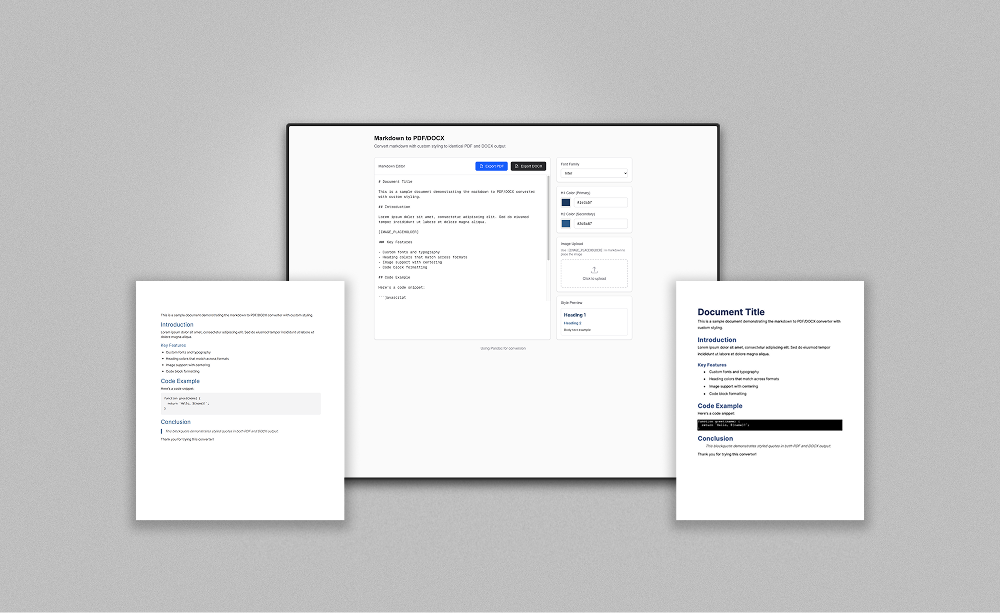
Convert Markdown documents to PDF and DOCX with custom fonts, heading colors, and embedded images.
Features
Markdown Editor
Write or paste Markdown with live style preview. Supports headings, lists, code blocks, blockquotes, tables, and more.
PDF Export
Generate styled PDF documents via Pandoc and wkhtmltopdf with embedded Google Fonts and custom colors.
DOCX Export
Create Word documents with matching styles using the docx library. Identical output to the PDF version.
Custom Fonts
Choose from 10 popular Google Fonts including Inter, Roboto, Montserrat, Playfair Display, and more.
Color Theming
Set primary and secondary heading colors that apply consistently across both PDF and DOCX output.
Image Embedding
Upload images and place them in your document with a simple placeholder. Images are embedded as base64 in both formats.
How It Works
Write Markdown
Enter your content in the built-in editor or paste existing Markdown.
Customize Styles
Pick a font, set heading colors, and optionally upload an image.
Export
Click Export PDF or Export DOCX. The server converts your Markdown with the chosen styles and returns the file.
Tech Stack
| Framework | Next.js 16 (App Router) |
| UI | React 19, Tailwind CSS v4 |
| Language | TypeScript 5 |
| PDF Engine | Pandoc + wkhtmltopdf |
| DOCX Engine | docx (npm) |
| Markdown Parser | marked |
| Fonts | Google Fonts API |
| Package Manager | pnpm |
Getting Started
git clone https://github.com/owieth/multi-docs-demo.git
cd multi-docs-demo
pnpm install
pnpm dev
Requires Node.js, Pandoc, and wkhtmltopdf installed on your system.